


How To: First-Time Sign-Up
This guide will help new members complete their first sign-up using a referral link and get started with their dashboard.
Step 1: Open Your Referral Link
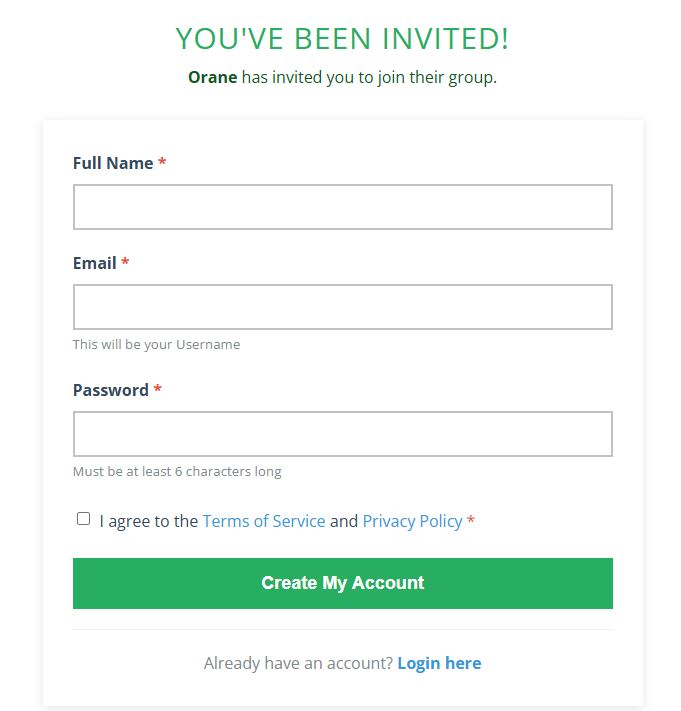
Click the referral link you received via email or from your inviter. This will take you to the sign-up page pre-filled with your group information.
Step 2: Create Your Account
Enter your Full Name, Email (this will be your username), and choose a Password. Make sure your password is at least 6 characters long.
Step 3: Agree to Terms
Check the box to agree to the Terms of Service and Privacy Policy before creating your account.
Step 4: Submit Your Account
Click the “Create My Account” button to finish the registration process. You will then receive a confirmation email to verify your account.
Step 5: Explore Your Dashboard
Once logged in, explore your dashboard, watch tutorial videos, and familiarize yourself with all available features for your account.
⚠️ Important Notes
Make sure to open the referral link and complete all steps to access your dashboard properly.
Access Your Membership Dashboard
You can access your Membership Dashboard anytime by clicking the link below or navigating from your account menu. Here, you can manage members, view statistics, and access tutorials: